
Ask Reuben – January 30, 2026
TagEdit

What is the tagEdit custom widget?
How do I code for the tagEdit widget?
Does Genero have a Multi-Select and/or Chip widget?
The Genero Browser Client 5.01.06 release included two new custom widgets. One was the phoneEdit and the other was tagEdit. The one I am interested for this article is the tagEdit custom widget.
If you keep your eyes open, you will see this type of widget in other applications. Your typical e-mail application allows you to select multiple names and these appear as separate graphical objects inside the To, Cc, Bcc fields. If you use JIRA you will see this in fields such as Label. …
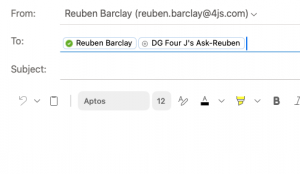
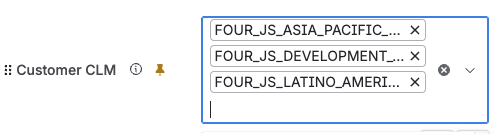
… the key characteristic is of one or more values being entered into the one widget, and the UX provides a way for you to add to the list, remove values from the list as well as typing directly into the widget. Other frameworks you might see this called a Multi-Select widget, and the name for the different values and how they appear might be words such as tags, bricks and chips. For us we are using the word tagEdit. How you choose to use a tagEdit is via Presentation Styles. With EDIT and BUTTONEDIT widgets, the customWidget Presentation Style Attribute will now accept the value tagEdit. In the future, you may see a dedicated form widget and in Genero Studio the ability to specify this type of widget directly rather than coding it via Presentation Styles, but for now it is a case of using For programming around the tagEdit widget, there is a page in the documentation. Some of the key points to notice are It is most likely you will be using tagEdit in conjunction with COMPLETER. I extended the Auto Completion example I had in our GitHub repository to also have a field that uses tagEdit. It is the 3rd of the 4 fields in the example, the field named “Countries” Key programming points are: If you run the example, go down into the 3rd value “Countries” you can generate screenshots like …
<Style name="Edit.multiselect">
     <StyleAttribute name="customWidget" value="tagEdit" />
</Style>
customWidget="tagEdit" for ButtonEdit and Edit in your .4st. Also in the future you may see this customWidget available for TextEdit widget as well.
customWidget="tagEdit"
STYLE="tagedit"COMPLETER attributeON CHANGE countries block, there are three key points.
CALL split_on_last_semi_colon(filter) RETURNING prefix, filter which takes the value that is in the field and splits it in two as the name suggests on the last semi-colon. . What is before the last semi-colon is the values that have been entered already, these need to be kept for later use (this is the variable named prefix. What is after the last semi-colon is what will be used to do the database query to determine the potential values the user might want to add to the list (this is the variable named filter)OPEN country_curs USING filter. Note that the line immediately before this of LET filter = filter, "%", this is to find entries that begin with the value entered, this could equally have been LET filter = "%",filter, "%" if you want to do values that filter is contained in.LET completer_list[i] = SFMT("%1;%2;", prefix, country_name CLIPPED). The completer list will only show the country name but when the selected value is written to the 4gl variable it will be written with the prefix attached to it. This is the value that will be written into the 4gl variable.
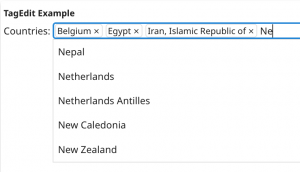
… no prize for guessing the significance of the countries mentioned and what the value selected should be.
The key thing to note about the User Experience as you see it, is that there are …
- 3 values already entered
- the user can remove a value by clicking on the X inside each chip/tag
- the user is selecting from a list to add a value
- the user could potentially type a new value
Programatically at this point,
- the value passed into the split_on_last_column is “Belgium;Egypt;Iran, Islamic Republic of;Ne” which is parsed to produce prefix=”Belgium;Egypt;Iran, Islamic Republic of” and filter=”Ne”.
- The database statement executed is SELECT name FROM country WHERE UPPER(name) LIKE “ne%” ORDER BY name LIMIT 50.
- The values that the completer list array is populated with are …
- Belgium;Egypt;Iran, Islamic Republic of;Nepal;
- Belgium;Egypt;Iran, Islamic Republic of;Netherlands;
- Belgium;Egypt;Iran, Islamic Republic of;Netherlands Antilles;
- Belgium;Egypt;Iran, Islamic Republic of;New Caledonia;
- Belgium;Egypt;Iran, Islamic Republic of;New Zealand;
- If the user selects one of these values, that is what the 4gl variable rec.countries will now be populated with.
It is up to the developer to then manage how the value of rec.countries is then written to the database. They could pass it directly into a big enough CHAR/VARCHAR column, or split using semi-colon and write one row per chip/tag, or perhaps use an exotic database type that the database allows for this sort of data but this will require a transformation of the value entered.
There are two other examples you can reference.
- This page in the documentation has an example
- The GBC project sources contain an example in tests/genero_samples/public/tagEdit
I would encourage you to look at all three, you may find the programming style in one of the other examples closer to your natural style and thus easier to read.
I should also mention that there is one configuration option. You can control wether the user is allowed to enter new values, or if they must select from a list via the allowTagCreation presentation style attribute.
If you do get stuck implementing tagEdit if in doubt, refer to the page in the documentation on Multi-Valued fields. For me I initially thought it was a little odd having to include the prefix in the list of completer options but once I realised this is the value that is written to the 4gl variable, it became clearer why it was implemented like that.