
Ask Reuben – December 1, 2025
ButtonEdit Background

What are these blue columns now appearing in a Table?
When transforming from Native to Universal Rendering, amongst the common comments are … It is these blue columns I will address in this article. The screenshots in the Image below show Native Rendering and Universal Rendering (GBC 5.01.08) of the same program, code for which is given at the end of the article….
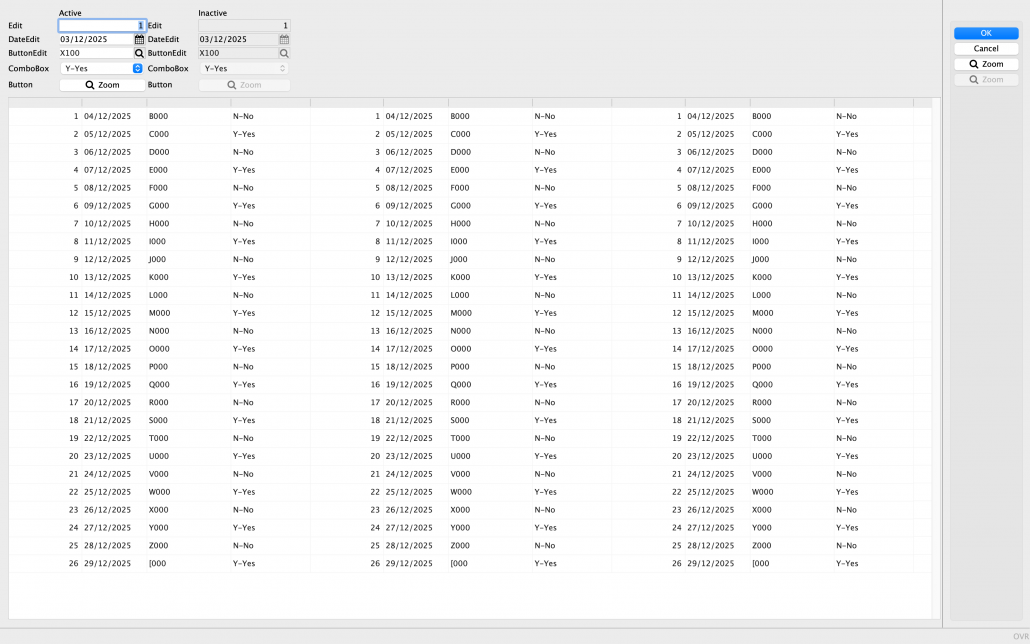
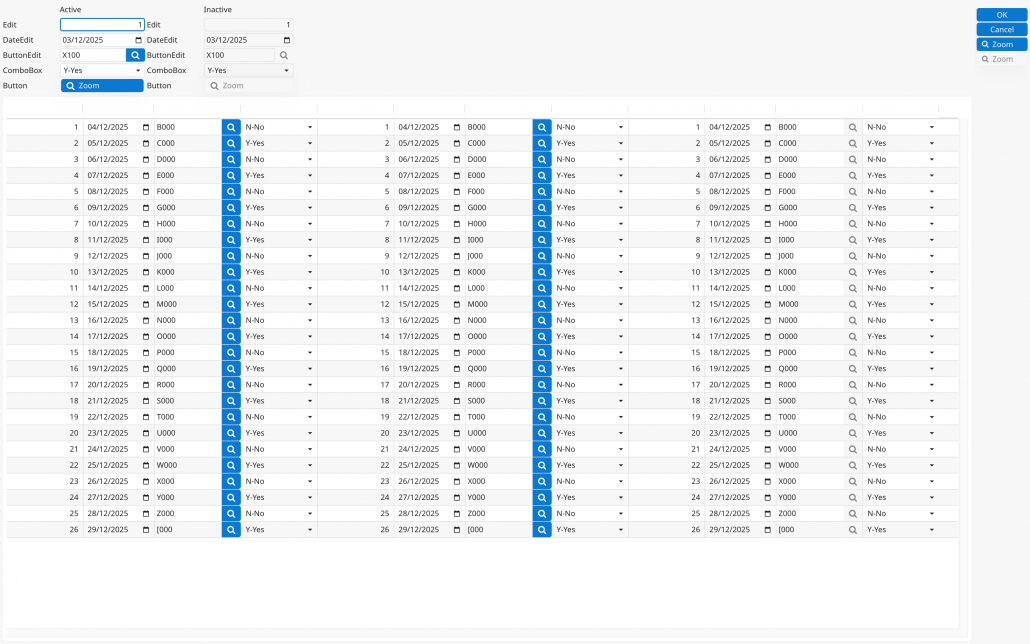
… note the blue columns that appear in the table under Universal Rendering. There are two factors that explain what these blue columns are and why you see them.
- Widget decoration is rendered for all populated rows and fields of the TABLE, not just the current field on the current row in the TABLE. This means you can see the BUTTONEDIT button, the DATEEDIT calendar icon, the COMBOBOX dropdown etc on all applicable rows and columns. This better represents the fact you can click on these icons and trigger the appropriate functionality, wether that is the 4GL action in the case of the BUTTONEDIT, the calendar to select a date in the case of a DATEEDIT, the dropdown list in the case of a COMBOBOX etc.
- The BUTTONEDIT widget is rendered by rendering an EDIT widget and a BUTTON widget adjacent to each other. The rendering of the BUTTON part of the BUTTONEDIT widget is consistent with how BUTTON’s are rendered. Note that the active OK/Cancel button on the right has a blue background / white text / white icon as does the BUTTON in the form, and as does the BUTTON part of the BUTTONEDIT widget.
These two factors combined, result in this appearance of the blue columns in your table, one column for each active BUTTONEDIT.
It is important to note that with this User Experience,
- anywhere a user can click is visually indicated, a user does not have to click in a field to see what is available for that field. (I suspect that if the BUTTONs were not blue, most people would be ok with this improvement)
- all buttons are rendered the same wether used as a BUTTON or as part of a BUTTONEDIT (it could be argued that the button part of a DATEEDIT, or COMBOBOX widget is not rendered the same as a BUTTON, discussion for another day …)
Fortunately you can use GBC Customization to change the appearance.
As the customizaton is not as simple as changing a Theme Variable, you should treat what I am showing as a starting point. You may need to extend, refine or review over time. If there is strong demand for some of this then we should consider adding a Theme Variable to control. I am going to show two bits of customization, you can decide wether to implement one or both. You maybe happy with just changing the color of BUTTON, or you might be happy with just changing when the widget decoration is visible.
First is to use style sheets and add to customization.scss some CSS that changes the appearance of the decoration of a widget so that it only displays when the field has focus …
.gbc_RTableWidget .gbc_RTableItemWidget > .gbc_ButtonEditWidget {
 > .gbc_ButtonWidget {
 display: none;
 }
 &.gbc_Focus > .gbc_ButtonWidget {
 display: block;
 }
}

.gbc_RTableWidget .gbc_RTableItemWidget > .gbc_DateEditWidget {
 > .zmdi-calendar-blank {
 display: none;
 }
 &.gbc_Focus > .zmdi-calendar-blank {
 display: block;
 }
}

.gbc_RTableWidget .gbc_RTableItemWidget > .gbc_ComboBoxWidget {
 > .gbc_ComboBoxWidget__button {
 display: none;
 }
 &.gbc_Focus > .gbc_ComboBoxWidget__button {
 display: block;
 }
}
… This uses display:none for this decoration, but sets it to display:block when the widget has focus. Note the style selector is different for each widget. You would have to add similar lines for other widgets. Finding a selector is a case of using Developer Tools (or your browsers equivalent) to identify the selectors available for a form element.
The second thing you can do is change the appearance of BUTTON via Theme variables. In this instance I have added the following into my theme.scss.json file …
{
  "mt-button-text-color"                       : "$ui-text-icon-color",
  "mt-button-background-color"                 : "$ui-field-color",
  "gbc-ButtonWidget-focus-color"               : "$ui-primary-color"
}
… this changes the color of the material button to the user interface text icon color, and changes the background color of the material button to the the user interface field color. Using the default colors, this results in BUTTONs that are black on white instead of white on blue.
If I compare before and after screenshots…
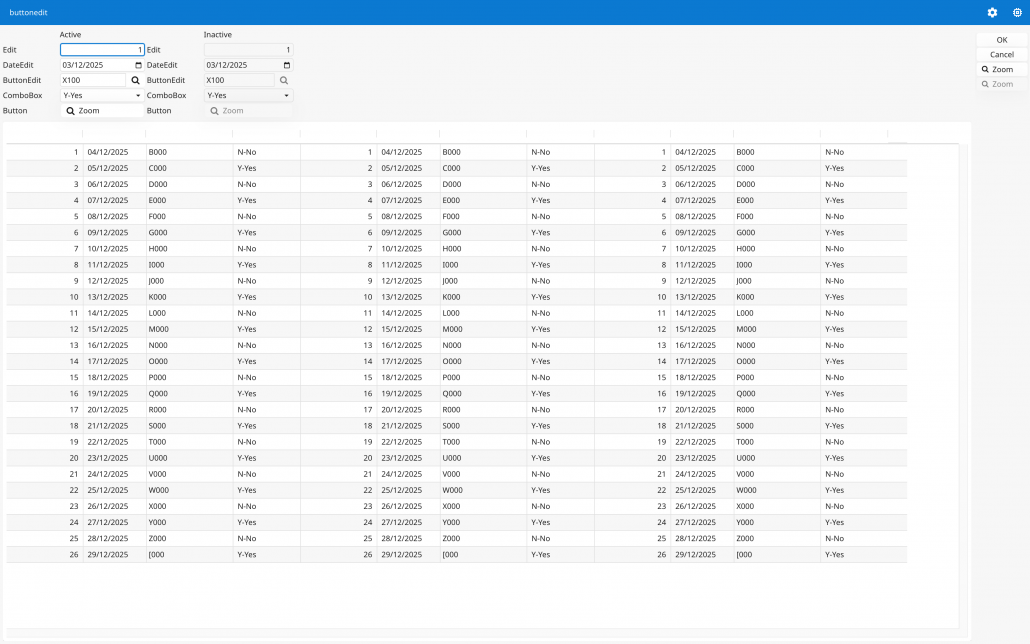
… we no longer have the blue columns.
There were two parts of the solution, you may find that you only want one part of the solution. You may also need to consider additional widgets. You would also need to make sure all combinations are covered. For example, inactive fields, fields with focus, light v dark mode and so on as appropriate for your situation.
#! askreuben306.4gl

MAIN
    DEFINE rec RECORD
        edit0 INTEGER,
        dateedit0 DATE,
        buttonedit0 CHAR(4),
        combobox0 CHAR(1)
    END RECORD
    DEFINE arr DYNAMIC ARRAY OF RECORD
        edit1 INTEGER,
        dateedit1 DATE,
        buttonedit1 CHAR(4),
        combobox1 CHAR(1),
        edit2 INTEGER,
        dateedit2 DATE,
        buttonedit2 CHAR(4),
        combobox2 CHAR(1),
        edit3 INTEGER,
        dateedit3 DATE,
        buttonedit3 CHAR(4),
        combobox3 CHAR(1)
    END RECORD

    DEFINE program_name STRING
    DEFINE i INTEGER

    WHENEVER ANY ERROR STOP
    DEFER INTERRUPT
    DEFER QUIT
    OPTIONS FIELD ORDER FORM
    OPTIONS INPUT WRAP

    LET program_name = base.Application.getProgramName()

    CALL ui.Dialog.setDefaultUnbuffered(TRUE)
    CLOSE WINDOW SCREEN

    LET rec.edit0 = 1
    LET rec.dateedit0 = TODAY
    LET rec.buttonedit0 = "X100"
    LET rec.combobox0 = "Y"

    FOR i = 1 TO 26
        LET arr[i].edit1 = i

        LET arr[i].dateedit1 = TODAY + i
        LET arr[i].buttonedit1 = ASCII (65 + i), "000"
        LET arr[i].combobox1 = IIF(i MOD 2 == 0, "Y", "N")

        LET arr[i].edit2 = arr[i].edit1
        LET arr[i].dateedit2 = arr[i].dateedit1
        LET arr[i].buttonedit2 = arr[i].buttonedit1
        LET arr[i].combobox2 = arr[i].combobox1

        LET arr[i].edit3 = arr[i].edit1
        LET arr[i].dateedit3 = arr[i].dateedit1
        LET arr[i].buttonedit3 = arr[i].buttonedit1
        LET arr[i].combobox3 = arr[i].combobox1

    END FOR

    OPEN WINDOW w WITH FORM program_name ATTRIBUTES(TEXT = program_name)
    DIALOG ATTRIBUTES(UNBUFFERED)
        INPUT BY NAME rec.* ATTRIBUTES(WITHOUT DEFAULTS = TRUE)
            ON ACTION zoom INFIELD buttonedit0
        END INPUT
        INPUT ARRAY arr FROM arr.* ATTRIBUTES(WITHOUT DEFAULTS = TRUE)
            ON ACTION zoom INFIELD buttonedit1
            ON ACTION zoom INFIELD buttonedit2
        END INPUT

        ON ACTION CLOSE
            EXIT DIALOG
        ON ACTION ACCEPT
            EXIT DIALOG
        ON ACTION CANCEL
            EXIT DIALOG
        ON ACTION zoom
        ON ACTION zoom_inactive


        BEFORE DIALOG
            DISPLAY rec.edit0 TO edit0i
            DISPLAY rec.dateedit0 TO dateedit0i
            DISPLAY rec.buttonedit0 TO buttonedit0i
            DISPLAY rec.combobox0 TO combobox0i

            CALL DIALOG.setActionActive("zoom_inactive", FALSE)

    END DIALOG
END MAIN
#! askreuben306.per
ACTION DEFAULTS
ACTION zoom (TEXT="Zoom", IMAGE="fa-search", DEFAULTVIEW=yes)
ACTION zoom_inactive (TEXT="Zoom",IMAGE="fa-search", DEFAULTVIEW=yes)
END
LAYOUT
VBOX
GRID
{
Active Inactive
Edit [f01 ] Edit [f01i ]
DateEdit [f02 ] DateEdit [f02i ]
ButtonEdit [f03 ] ButtonEdit [f03i ]
ComboBox [f04 ] ComboBox [f04i ]
Button [f05 ] Button [f05i ]
}
END
TABLE
{
[c01 ][c02 ][c03 ][c04 ][c11 ][c12 ][c13 ][c14 ][c21 ][c22 ][c23 ][c24 ]
}
END
END
ATTRIBUTES
EDIT f01 = formonly.edit0;
DATEEDIT f02 = formonly.dateedit0;
BUTTONEDIT f03 = formonly.buttonedit0, ACTION=zoom;
COMBOBOX f04 = formonly.combobox0, NOT NULL, ITEMS=(("Y","Y-Yes"),("N","N-No"));
BUTTON f05:zoom;
EDIT f01i = formonly.edit0i;
DATEEDIT f02i = formonly.dateedit0i;
BUTTONEDIT f03i = formonly.buttonedit0i, ACTION=zoom_inactive;
COMBOBOX f04i = formonly.combobox0i, NOT NULL, ITEMS=(("Y","Y-Yes"),("N","N-No"));
BUTTON f05i: zoom_inactive;
EDIT c01 = formonly.edit1;
DATEEDIT c02 = formonly.dateedit1;
BUTTONEDIT c03 = formonly.buttonedit1, ACTION=zoom;
COMBOBOX c04 = formonly.combobox1, NOT NULL, ITEMS=(("Y","Y-Yes"),("N","N-No"));
EDIT c11 = formonly.edit2;
DATEEDIT c12 = formonly.dateedit2;
BUTTONEDIT c13 = formonly.buttonedit2, ACTION=zoom;
COMBOBOX c14 = formonly.combobox2, NOT NULL, ITEMS=(("Y","Y-Yes"),("N","N-No"));
EDIT c21 = formonly.edit3;
DATEEDIT c22 = formonly.dateedit3;
BUTTONEDIT c23 = formonly.buttonedit3, ACTION=zoom_inactive;
COMBOBOX c24 = formonly.combobox3, NOT NULL, ITEMS=(("Y","Y-Yes"),("N","N-No"));
INSTRUCTIONS
SCREEN RECORD rec(edit0, dateedit0, buttonedit0, combobox0)
SCREEN RECORD arr(edit1, dateedit1, buttonedit1, combobox1,edit2, dateedit2, buttonedit2, combobox2,edit3, dateedit3, buttonedit3, combobox3);