
Early Access Program
Genero Application Server & Four Js Genero Language & Web Services 6.01.00 is now open
Irving, Texas – October 21rst 2026 – Four Js is pleased to announce that the Early Access Program for Genero Application Server (GAS) and Four Js Genero Language & Web Services (FGLGWS) 6.01.00 is now open. This release brings native OpenTelemetry tracing to your Genero applications and web services: follow each request end to end, measure every step, and pinpoint the code behind a slowdown without changing a single line of your existing code.
If this is your first time participating in a Four Js EAP, please read the section “What is an EAP?” in the sidebar where you will learn how to subscribe to this service.
With GAS & FGLGWS 6.01.00, every HTTP request becomes one distributed trace that follows it through the whole chain:
- Use any user agent traceparent ID (if present)
- GAS dispatcher
- UA proxy or GWS proxy
- Genero runtime (fglrun) — each 4GL function call and each SQL statement
Each step shows how long it took. Because every trace also records where in your Genero code it was produced — module, function and line — your teams go straight from a slow request to the code responsible.
Key highlights
- Built on an open standard. Traces are exported in OpenTelemetry format, so they flow into the observability tools you already use — Jaeger, Grafana Tempo, Datadog or any OTLP-compatible collector. No proprietary lock-in.
- End-to-end visibility. One trace covers the full journey of a request, from the user agent through GAS and its proxies down to the 4GL code that runs.
- Down to the function and the query. See the duration of each 4GL function call and each SQL statement, with the exact place in the code that produced it.
- Web services included. Genero web services get the same level of tracing as your applications. If a client already sends a W3C trace context, GAS continues that trace.
- Zero code change. Tracing is a configuration setting. Your existing Genero code runs as it is.
- Safe by default. Tracing is off until you turn it on, and SQL values are masked by default so business data stays out of your traces.
Known limitations
- Server-side 4GL instrumentation covers
com.WebServiceEngine.ProcessServices()only. Web services dispatched throughProcessServices()produce the full span tree: the request span, the 4GL function spans and the SQL spans. A service that handles its requests any other way shows only the GAS infrastructure spans, from the dispatcher and gwsproxy, with no spans from the program itself. - No browser instrumentation in the GBC. The GBC creates no client spans and injects no W3C traceparent header. Every UA request therefore starts a new root trace in GAS, and a user action can’t be followed from the browser to the server.
- Outgoing GWS client calls are not instrumented. A 4GL program calling a web service creates no CLIENT span and doesn’t propagate the trace context. The called service starts its own trace, so a chain of service-to-service calls appears as separate, unlinked traces.
- Attribute values are not converted to UTF-8. OTLP requires UTF-8 strings, but the runtime sends SQL text, identifiers and captured values in the locale charset. Any byte sequence that isn’t valid UTF-8 is replaced with U+FFFD (�), so non-ASCII text from a non-UTF-8 locale can’t be read in the trace backend. Running the application in a UTF-8 locale avoids this.
See it in action
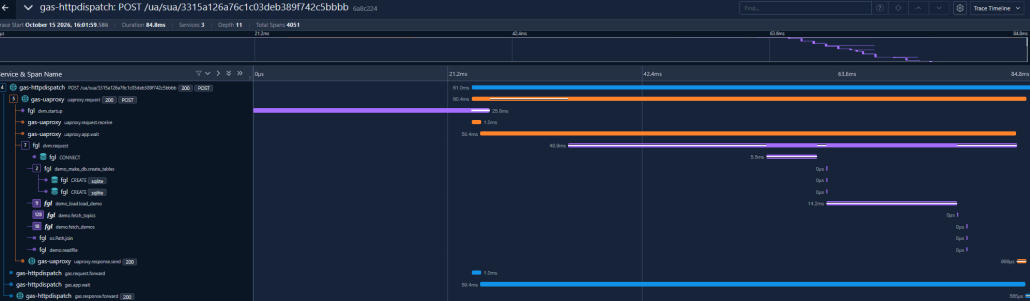
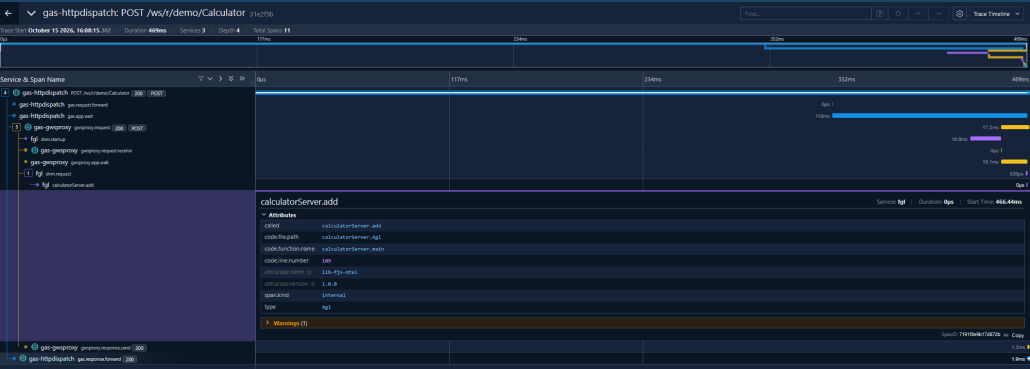
Here is what a trace looks like in Jaeger, an open-source tracing tool.
A Genero application — from the user’s action to the 4GL function and the SQL query behind it
A Genero web service — from the incoming call to the service function that answers it:
Turn it on in one minute
You choose how widely tracing applies:
- Everywhere: set the
res.otel.enabledresource in as.xcf. - For one application or web service, on a running server: use the new commands
gasadmin application enable-otelandgasadmin service enable-otel— no file to edit, no restart.
To see the 4GL function and SQL spans, use the Genero runtime (fglrun) 6.01.00 or later. GAS exports traces over OTLP/HTTP to any compatible collector.
How to join the EAP ?
To get started, you can review our [OpenTelemetry quickstart guide (PDF)] takes you from a standard GAS installation to your first trace on screen in about ten minutes, with Jaeger running on your workstation.
Please note:this EAP is provided for testing and feedback purposes only. Please do not use this version in production environments. It may contain bugs, incomplete features, or performance issues. Additional features may be added during the EAP, so we recommend frequent visits to the forum.
We appreciate your interest in pre-release access to our products, and value your feedback.
Best Regards,
The Four Js Development Team
