Example: upload a file as attachment in request body
Upload files by adding WSAttachment to an input parameter.
In this sample REST function, there is one input parameter:
- The "fname" parameter is defined as type
STRINGwith a WSAttachment attribute. TheWSAttachmentpattern "[A-Za-z0-9_-]+.(jpg|jpeg|png)" matches filenames that begin with one or more letters, digits, underscores, or hyphens, followed by a literal dot and a lowercase extension of jpg, jpeg, or png (case-sensitive). Example matches: image-01.jpg, photo_2.jpeg. The REST engine treats the parameter value as a path to a file to be attached.Use a regex to keep filenames predictable, block unsafe input (for example, "../"), and limit allowed extensions.
- The
WSMediaattribute handles the data format for images. The wildcard media type (image/*) in the WSMedia attribute lets the service accept or return any image format. If the file can be of any type (not only images), omit theWSMediaattribute fromWSAttachment.
The GWS stores the uploaded file in a temporary directory and returns its absolute path in the input parameter fname. The file will be removed when the call ends unless you save it to disk.
Compute the destination path and move the file:
- Set the destination path:
LET dest = os.Path.join("/data/images", os.Path.baseName(fname))(os.Path.baseName strips any directory components)
- Move the uploaded file from its temporary location to dest:
LET ok =
os.Path.rename(fname, dest)
IMPORT os

PUBLIC FUNCTION uploadImage(
    fname STRING ATTRIBUTES(WSAttachment = "[a-zA-Z0-9_\-]+\.(jpg|jpeg|png)",
        WSMedia = "image/*",
        WSDescription = "Image file to upload (jpg, jpeg or png)"))
    ATTRIBUTES(WSPost,
        WSPath = "/upload/image",
        WSDescription = "Upload an image file with validation of filename")
    RETURNS STRING ATTRIBUTES(WSMedia = "application/json")

    DEFINE dest STRING
    DEFINE ok INTEGER

    -- Store the image in /data/images with its secure name
    LET dest = os.Path.join("/data/images", os.Path.baseName(fname))

    -- Move the temporary file
    LET ok = os.Path.rename(fname, dest)

    RETURN SFMT('{"status":"ok","file":"%1"}', dest)

END FUNCTION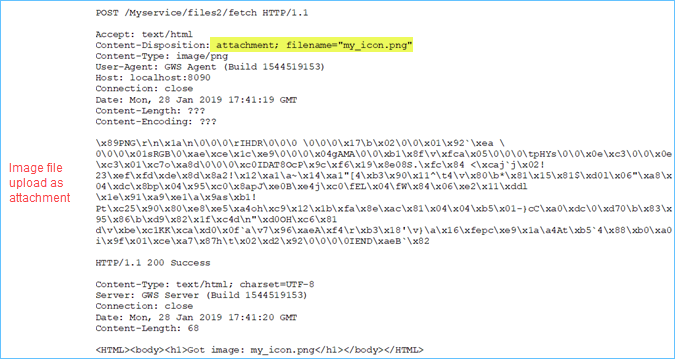
In Figure 1 the image is sent as an attachment in the message body.