View event logs
View a history of login, logout, and token request events recorded by the Genero Identity Provider (GIP) in the Console App.
The event log gives GIP administrators visibility into user activity across the system — who logged in, when, and through which application — providing a historic record useful for monitoring and accountability.
This feature requires the GIP database to be upgraded to version 3.1 or later. To upgrade, run the StarterApp. See Migrate your Genero Identity Provider database.
Event logging
The GIP records the following events to a dedicated table in the GIP database for historic purposes:
- Login attempts
- Logout attempts
- Token requests
Event logs display
In the Console App, select to open the event log viewer. This menu is only available to GIP administrators
(users with the Role.Admin role).
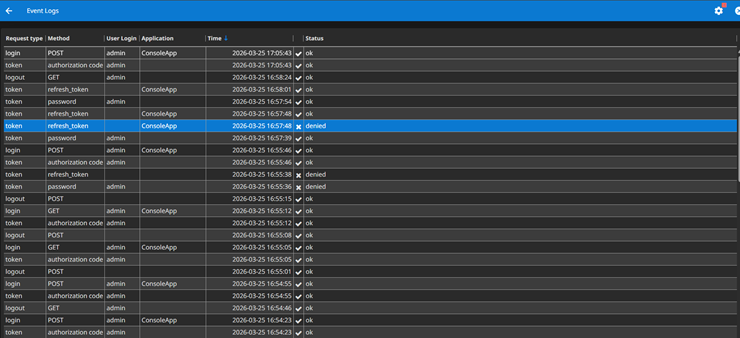
- Request type — The type of event:
login(a user authentication attempt),logout(a user sign-out request), ortoken(an OAuth2 token request made by an application). - Method — The method used for the request.
- For login and logout events:
POSTorGETindicates the HTTP method used for the request.delegatedindicates the user authenticated via an external IdP. See Delegate SSO to an external Identity Provider. - For token requests, indicates the OAuth2 grant type used:
authorization_code(interactive user login flow),password(direct credential submission, used by tools such as GetToken),client_credentials(service-to-service authentication, no user involved), orrefresh_token(token renewal without re-authentication). For more information about tokens, go to Manage refresh tokens and GetToken.
- For login and logout events:
- User Login — The user's login, if available.
- Application — The application name, if available.
- Time — The timestamp of the logged event.
- Status — The status of the request once processed.
Events can be sorted by column; additional capabilities will be introduced in future releases.