GBC 6.00.01 new features and upgrade notes
A summary of new features and changes in functionality introduced with Genero Browser Client (GBC) 6.00.01. Note the changes you may need to make when moving to this version of the GBC.
This page covers only those new features introduced with the Genero Browser Client version specified in the page title. Check prior new features pages if you migrate from an earlier version.
For a detailed list of GBC 6.00.01 changes, please refer to the list of fixes on our issue tracker.
Previous new features page: GBC 6.00.00 (5.01.08) new features and upgrade notes.
Local notifications in desktop browsers
The GBC now supports local notifications on desktop browsers using the browser’s notification API. Applications can create notifications, remove them, and retrieve details of user interactions using the following front calls:
standard.createNotification- Creates a notification to be displayed on the host system.standard.clearNotifications- Removes notifications displayed on the host system.standard.getLastNotificationInteractions- Retrieves details of user actions on notifications since the last check.
For more information on these front calls, go to the Genero Business Development Language User Guide.
Offline mode
When the browser loses its internet connection, GBC displays a floating banner to notify users:
There is an issue with your connection.
Please check your network to continue using the application.
The banner remains visible for the entire duration of the offline state. Users can drag the banner to view content that is partially hidden behind it.
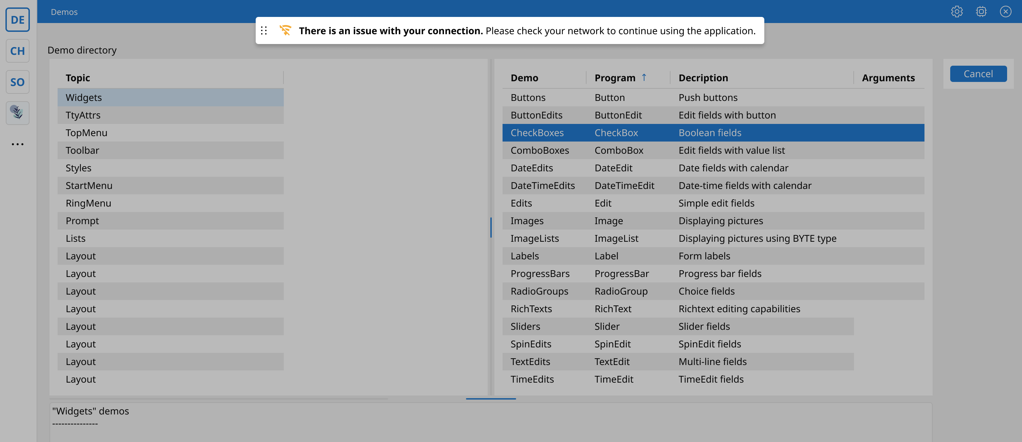
When the internet connection is restored, the banner disappears automatically. A notification
appears in the bottom‑right corner of the screen stating The connection has been
re-established.
Offline mode is disabled by default when running under Genero Desktop Client (GDC), Genero Mobile for Android (GMA), Genero Mobile for iPhone (GMI), or Genero Web Applications (GWA). Offline mode is also disabled by default on localhost to prevent offline behavior from being triggered during local development.
?offlinemode=1enables offline mode.?offlinemode=0disables offline mode.
gbc-offline-mode = enabled | disabled | auto- URL query string (
offlinemode). - Theme variable (
gbc-offline-mode). - Default behavior.
Topmenu
The GBC now supports docking the topmenu to a left panel when using sidebar rendering on desktop. The docked panel is resizable and can be set as the default. For full details, go to Application page for GBC.
ImageBorderRadius support for Image and Table nodes
The imageBorderRadius 4ST attribute for images and table image columns is now
supported, allowing rounded or circular image rendering. For more information, go to Genero Business Development Language User Guide.
Changes to GBC JavaScript Utility Functions
In previous versions of the GBC, some GBC specific utility functions were added directly to
standard JavaScript objects such as Array, String,
Math, and Window. From GBC 6.00.01, this behavior has changed. GBC
no longer adds or overrides functions on native JavaScript objects.
All GBC specific utility functions have now been either moved to dedicated
Helper classes (for example, cls.ArrayHelper,
cls.StringHelper, cls.WindowHelper) or removed if they were unused
or superseded by standard JavaScript functionality.
Any custom code that calls former GBC functions attached to native JavaScript objects must be updated to use the corresponding helper class, a native JavaScript alternative or removed.
This change affects helper functions formerly attached to the following JavaScript objects:
Array, Event, Math, Number,
Object, String, Function, and
Window.
| Previous GBC extension | Supported alternative |
|
|
|
Removed (never used) |
Array.contains |
Removed: Now native Array.includes is used. |
| Previous GBC extension | Supported alternative |
Event.preventCancelableDefault |
cls.EventHelper.preventCancelableDefault |
Event.normalizeEventForGBC |
Removed (never used) |
| Previous GBC extension | Supported alternative |
|
|
Math.sign (polyfill) |
Removed (never used) |
| Previous GBC extension | Supported alternative |
|
|
|
|
| Previous GBC extension | Supported alternative |
|
|
|
Removed (never used) |
| Previous GBC extension | Supported alternative |
|
|
|
Removed (never used) |
|
|
| Previous GBC extension | Supported alternative |
|
|
| Previous GBC extension | Supported alternative |
|
|
|
Removed (never used) |
Window.updateCapslockFlag |
cls.KeyboardHelper.updateCapslockFlag |
Theme variable for adjusting TableMenuButton visibility delay
The TableMenuButton is the floating button shown above a table when it initially
loads. In previous versions of the GBC, the display duration of this button was fixed at 2500
milliseconds.
Starting with GBC 6.00.01, the new theme variable
gbc-TableMenuButton-display-time defines the display time of the
TableMenuButton in milliseconds. If the variable is not set, the default behavior
remains unchanged.
Theme variable for controlling SideBarDrawer display modes
A new theme variable, gbc‑SideBarDrawer‑display‑mode, has been added to
configure how the SideBarDrawer is displayed when opened via the App Grid Icon.
The variable supports the following values:
all(default) – TheSideBarDraweropens as a floating panel and can be docked or undocked using the button located at the top‑right of the drawer.docked– TheSideBarDraweropens directly in docked mode and is never shown as a floating panel. This value is ignored on mobile.floating– TheSideBarDraweralways opens as a floating panel and cannot be docked.