Install license with Four Js License Manager (via internet)
Use this procedure to license a Genero product using the FLM command line tool, flmprg. During installation, the license is registered with Four Js via the internet.
(FLM-9): Failed to open file 'C:\Program Files\FourJs\flm6/etc/license/license-TAB#AAAXYZ.dat' for writing.
To follow this procedure, you must have internet access from the FLM server to validate the license.
To install your license, you must have either a license file, a license string, or your license number, license key, and customer login.
You can install the license using one of these methods:
If your server is connected to the internet and you prefer automated installation, go to Steps to licensing with FLM for a comparison of license string and key-based methods.
Install using a license file
For this task you need a license file.
Install using a license string
To escape at any stage, type "stop" at the prompt and
press enter.
Steps
Install using a license number and key
This process validates your license with Four Js over the internet using your license number, license key, and customer login.
To escape at any stage, type "stop" at the prompt and
press enter.
-
At the prompt:
Do you need to configure an HTTP proxy ? (y/n)Enter y if your access to the internet is through a proxy, and provide the required information for HTTP proxy, Port, and so on, when prompted; otherwise, enter n.Figure: Installing and Registering a License via HTTP with License Manager (flmprg) 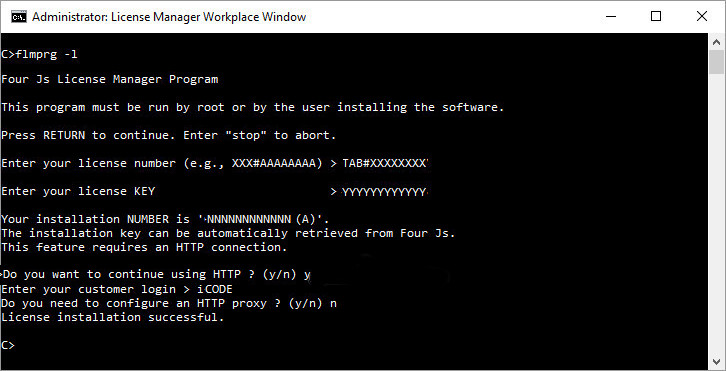
The installation of the license is complete.