Download a file as an attachment to a response
This example demonstrates how to return a file as an attachment using the
WSAttachment attribute
In order to return a file as an attachment to a client, set the WSAttachment attribute on an output parameter.
In this sample REST function a file is returned as attachment. The function has one
return parameter:
- A return paramater is defined as
STRINGtype with aWSAttachmentattribute. The REST engine treats the parameter value as a path to a file to be attached. - A
WSMediaattribute is added to handle the data format for images. The wildcard media type (image/*) in the WSMedia attribute lets the service accept or return any image format. If the file can be of any type (not only images), omit theWSMediaattribute fromWSAttachment.
The actual media type used for the request or response depends
on the Accept or Content-Type headers. Your code is responsible
for replacing the image/* placeholder with the concrete media type you expect or
receive. You can also use the WSContext attribute to set these headers explicitly.
WSError attributed variable is set with a description
of the error and the SetRestError() method is called to return it.IMPORT com
IMPORT os
PUBLIC DEFINE userError RECORD ATTRIBUTES(WSError = "User error")
message STRING
END RECORD
PUBLIC FUNCTION downloadImageFile()
ATTRIBUTES (WSGet,
WSPath = "/files3/images",
WSDescription = "download image file to the client with WSAttachment",
WSThrows = "400:@userError")
RETURNS (STRING ATTRIBUTES(WSAttachment, WSMedia = "image/*") )
DEFINE ret, fname STRING
DEFINE ok INTEGER
LET fname = "favicon.ico"
LET ok = os.Path.exists(fname)
IF ok THEN
LET ret = fname
ELSE
LET userError.message = SFMT("File (%1) does not exist", fname)
CALL com.WebServiceEngine.SetRestError(400,userError)
END IF
RETURN ret
END FUNCTION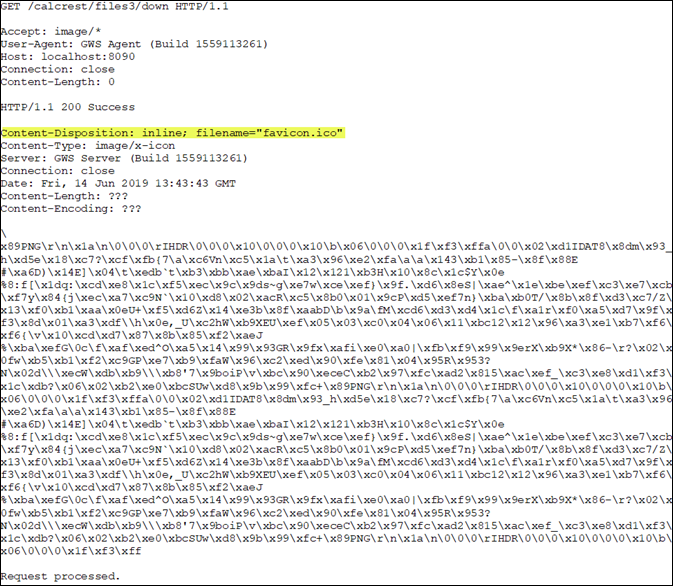
In Figure 1 the Content-Disposition response header in the output indicates
that the content is expected as an attachment. Therefore, when the function is called, the file is
downloaded and saved to the client locally in its TMP directory.