JSONAllOf
Combine multiple record schemas into a single type using the JSONAllOf attribute in Genero BDL.
Syntax
JSONAllOf is an optional attribute that allows you to combine multiple record types into a single schema, following the JSON Schema allOf keyword.
This serializer-specific attribute is supported only by json.Serializer and does not work with util.JSON.
Usage
The JSONAllOf attribute lets you define a type that combines the properties of
multiple record types. This is useful when you want to build more complex types from smaller,
reusable components. The resulting type includes all unique properties from the referenced record
types.
If you need to preserve the original structure of allOf schemas instead of
merging them, you can use an option in fglrestful. By running fglrestful
--no-merge-allof, you disable property merging for schemas that use the
JSONAllOf attribute, ensuring the schema’s allOf composition remains intact.
BDL Example
This sample illustrates how to apply the JSONAllOf and
JSONRequired attributes to define composite and mandatory properties in JSON
schemas.
IMPORT com

DEFINE g_nextId INTEGER = 1
DEFINE Employees DYNAMIC ARRAY OF Employee

TYPE Address RECORD
    street STRING,
    city STRING ATTRIBUTE(JSONRequired)
END RECORD

TYPE Person RECORD
    id INTEGER,
    name STRING ATTRIBUTE(JSONRequired),
    age INTEGER
END RECORD

TYPE Employee RECORD ATTRIBUTE(JSONAllOf)
    employeeInfo Person,
    employeeLocation Address
END RECORD

FUNCTION getEmployee(
    id INTEGER ATTRIBUTE(WSParam))
    ATTRIBUTE(WSGet, WSPath = "/getEmployee/{id}")
    RETURNS(Employee)
    DEFINE emp Employee
    DEFINE ind INTEGER
    DEFINE foundId BOOLEAN

    IF Employees.getLength() = 0 THEN
        LET Employees[1].employeeInfo.id = 1
        LET Employees[1].employeeInfo.name = "Alice"
        LET Employees[1].employeeInfo.age = 30
        LET Employees[1].employeeLocation.street = "Rue Montesquieu"
        LET Employees[1].employeeLocation.city = "Paris"
    END IF

    FOR ind = 1 TO Employees.getLength()
        IF Employees[ind].employeeInfo.id = id THEN
            LET emp = Employees[ind]
            LET foundId = TRUE
            EXIT FOR
        END IF
    END FOR

    IF NOT foundId THEN
        CALL com.WebServiceEngine.SetRestError(404, "Employee not found")
    END IF

    RETURN emp
END FUNCTION

FUNCTION addEmployee(
    empIn Employee)
    ATTRIBUTE(WSPost, WSPath = "/addEmployee", WSRetCode = '2XX')
    RETURNS(Employee)
    DEFINE empOut Employee

    # Generate a dummy ID
    LET g_nextId = g_nextId + 1
    LET empIn.employeeInfo.id = g_nextId
    LET Employees[Employees.getLength() + 1] = empIn

    DISPLAY "getlength: ", Employees.getLength()

    # Log server
    DISPLAY SFMT("Adding employee '%1' with id: %2",
        Employees[Employees.getLength()].employeeInfo.name,
        Employees[Employees.getLength()].employeeInfo.id)

    CALL com.WebServiceEngine.SetRestStatus(201)

    LET empOut = empIn
    RETURN empOut
END FUNCTION- The
JSONAllOfattribute is set on the EmployeeTYPEdefinition. Note: this attribute can only be applied toTYPEdefinitions. - Two separate records, Person and Address, are defined and
combined into Employee at runtime. Each record has unique field names, ensuring
compatibility with JSON Schema
allOfsemantics. JSONRequiredis used withnameinPersonandcityinAddressto enforce these mandatory fields.
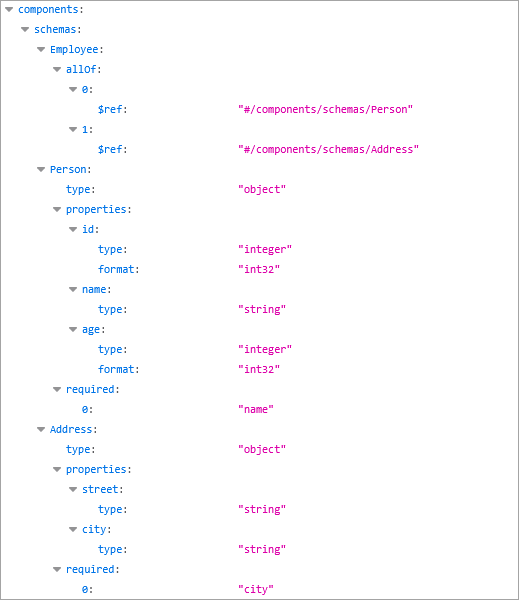
In the OpenAPI documentation, the GWS creates the JSON schema with allOf
property.
Compilation and validation rules
-
Restriction to TYPE definitions:
JSONAllOfcan only be used inTYPEdefinitions. -
Mutual exclusion:
JSONAllOfcannot be used withJSONOneOforJSONAdditionalPropertieson the same type. UsingJSONAllOfwithJSONOneOforJSONAdditionalPropertieswill result in error-9150 -
Restriction to RECORD types: Only
RECORDtypes are allowed as subschemas. UsingJSONAllOfwith unsupported types or functions will result in error-9153 -
Unique property names: All property names in the combined records must be unique. Using
JSONAllOfwith duplicate properties will result in error-9154 -
No nested JSONAllOf: Nesting
JSONAllOfattributes within anotherJSONAllOfstructure is not permitted, as it can create ambiguity and will result in error-9155.