Phone number fields
Phone number fields allow to display and input formatted telephone numbers, with international call prefix selection.
Introduction to phone editor fields
The EDIT text input field support telephone display and entry when using the
customWidget style attribute set to "phoneEdit":
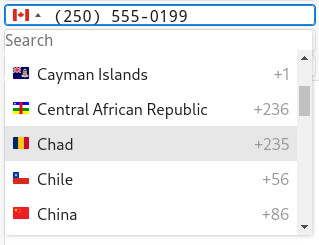
The raw value of the variable bound to the phone edit field must follow the ITU-T E.164 standard.
This string must start with a + sign, followed by the country code (CC), and the
local phone number, without separators. For example, a French telephone number value can be:
"+33388186120", while a Canadian number would be
"+12505550199".
If the raw value is an invalid phone number not following the E.164 standard or when the country code does not exist, the phone edit widget will display a global flag icon, and allow the text input without formatting.
The raw telephone number string is the value that will be exchanged (copy/paste) and stored in
your SQL database. This raw telephone value can be used directly in other APIs, for example to dial
a number on a mobile phone, with the standard.launchurl front call.
The text seen and entered by the user is automatically formatted, and the country code will
render as the flag of the corresponding country, on the left of the local phone number. For
example, the Canadian phone number value "+12505550199" will display with the
Canadian flag (representing the +1 country code prefix), followed by the formatted
local phone number "(250) 555-0199".
The phone edit widget enters in action when the field is controlled by an INPUT,
INPUT ARRAY or DISPLAY ARRAY dialog. If the dialog is a
CONSTRUCT, the widget will be a regular edit box, to allow any search criteria
input.
The phone edit widget can be combined with the autocompletion feature, to provide the list of phone numbers that can be entered in the field. For more details about this feature, read Enabling autocompletion.
- The
PLACEHOLDERattribute is ignored. - Edit cursor handling / position is ignored.
Defining the phone edit form field
In order to get the phone editor, define a form field with a STYLE attribute that will reference a
.4st style entry defining the customWidget attribute to
"phoneEdit".
In the LAYOUT section, consider defining the form field item tag that is large
enough for the automatic formatting.
Best practice is to force the input length to be of the size of the program
CHAR, VARCHAR variable (SCROLL) and let the field widget
stretch horizontally (STRETCH=X)
For example:
EDIT f1 = FORMONLY.phone,
              STYLE="phone",
SCROLL, STRETCH=X;customWidget style attribute
as "phoneEdit": <Style name="Edit.phone">
<StyleAttribute name="customWidget" value="phoneEdit" />
</Style>Storage data type for phone numbers
In the program code, the variable bound
to the phone editor form field, is typically of type VARCHAR(16), to store all possible international phone numbers, including
the plus sign and the country code.
The data type can also be a CHAR(size), if phone numbers are
already stored with this type in your database. Note however that the CHAR type
produces blank-padded values, which are not necessary with variable length phone numbers.
Dialing a phone number
"tel:" URL scheme followed by the raw phone number to build a string like
"tel:+33388186120", and execute the standard.launchurl front call
with this string:CALL ui.Interface.frontCall("standard", "launchurl",
[SFMT("tel:%1",rec.field1)], [])Example
<?xml version="1.0" encoding="ANSI_X3.4-1968"?>
<StyleList>
  <Style name="Edit.phone">
     <StyleAttribute name="customWidget" value="phoneEdit" />
  </Style>
<Style name="Window">
<StyleAttribute name="windowType" value="normal" />
</Style>
</StyleList>LAYOUT
GRID
{
Phone edit field:
[f1 ][b1]
Raw value field:
[f2 ]
}
END
END
ATTRIBUTES
EDIT f1 = FORMONLY.field1, STYLE="phone";
BUTTON b1: dial, IMAGE="fa-phone";
EDIT f2 = FORMONLY.field2;
ENDIMPORT util
MAIN
DEFINE rec RECORD
field1 VARCHAR(16),
field2 VARCHAR(16)
END RECORD
LET rec.field1 = "+33388186129"
LET rec.field2 = rec.field1
OPTIONS INPUT WRAP
CALL ui.Interface.loadStyles("mystyles")
OPEN FORM f1 FROM "form"
DISPLAY FORM f1
OPTIONS INPUT WRAP
MENU "test"
COMMAND "CONSTRUCT"
VAR sqlcond STRING
CONSTRUCT BY NAME sqlcond ON field1, field2
BEFORE CONSTRUCT
MESSAGE "We are in a CONSTRUCT"
END CONSTRUCT
MESSAGE "sqlcmd = ", sqlcond
COMMAND "INPUT"
INPUT BY NAME rec.* ATTRIBUTES(UNBUFFERED,WITHOUT DEFAULTS)
BEFORE INPUT
MESSAGE "We are in an INPUT"
AFTER FIELD field1
LET rec.field2 = rec.field1
AFTER FIELD field2
LET rec.field1 = rec.field2
ON ACTION enable_f1
CALL DIALOG.setFieldActive("field1",TRUE)
ON ACTION disable_f1
CALL DIALOG.setFieldActive("field1",FALSE)
ON ACTION set_value_f1
LET rec.field1 = "+33388121234"
ON ACTION dial
CALL ui.Interface.frontCall("standard", "launchurl",
        [SFMT("tel:%1",rec.field1)], [])
END INPUT
COMMAND "Quit"
EXIT MENU
END MENU
END MAIN