Automatic action views
Action views can be rendered automatically in some form elements.
Form toolbars and topmenu elements can define specific items, to get automatic rendering of action views, for actions that exist for the current dialog.
With this feature, actions views can appear at the same time in the topmenu, toolbar and in the
action panel. In a typical use case of automatic action views, you want to hide the action panel
with the actionPanelPosition=none / ringMenuPosition=none style attributes for windows.
In a
TOOLBAR definition, add an AUTOITEMS (CONTENT=ACTIONS)
element in the definition:TOOLBAR
...
AUTOITEMS (CONTENT=ACTIONS)
...
ENDIn a
TOPMENU definition, add an AUTOCOMMANDS (CONTENT=ACTIONS)
element in the definition:TOPMENU
...
GROUP actions (TEXT="Actions")
AUTOCOMMANDS (CONTENT=ACTIONS)
END
...
ENDAdditionally,
CONTENT=WINDOWS or CONTENT=PROGRAMS options can
be used, to respectively get the list of current available windows, or the current running
applications. The end user can then switch between windows and applications from these
options:TOPMENU
...
GROUP windows (TEXT="Windows")
AUTOCOMMANDS (CONTENT=WINDOWS)
END
GROUP programs (TEXT="Programs")
AUTOCOMMANDS (CONTENT=PROGRAMS)
END
...
ENDFor more details about managing applications and windows, see also Containers for program windows.
The following screenshot shows the rendering of a
TOOLBAR with the three kind of
AUTOITEMS elements:TOPMENU
ITEM open ( IMAGE="open", TEXT="Open" )
SEPARATOR
AUTOITEMS ( CONTENT=ACTIONS )
SEPARATOR
AUTOITEMS ( CONTENT=PROGRAMS )
SEPARATOR
AUTOITEMS ( CONTENT=WINDOWS )
SEPARATOR
ITEM help ( IMAGE="help", TEXT="Help" )
END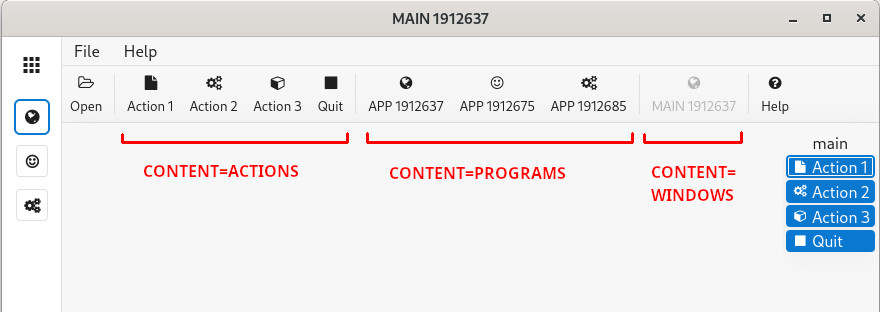
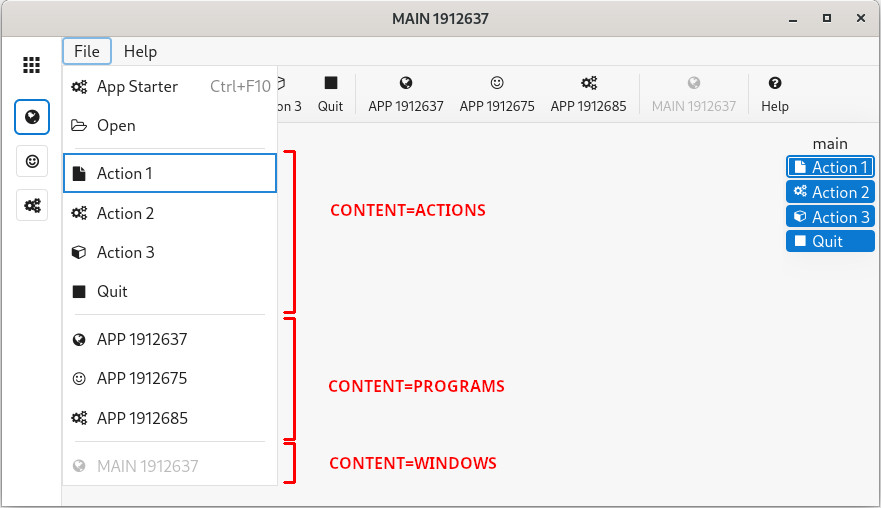
The following screenshot shows the rendering of a
TOPMENU with the three kind of
AUTOITEMS elements:TOPMENU
GROUP file (TEXT="File")
COMMAND startapp ( TEXT="App Starter" )
COMMAND open ( IMAGE="open", TEXT="Open" )
SEPARATOR
AUTOCOMMANDS ( CONTENT=ACTIONS )
SEPARATOR
AUTOCOMMANDS ( CONTENT=PROGRAMS )
SEPARATOR
AUTOCOMMANDS ( CONTENT=WINDOWS )
END
GROUP gz (TEXT="Help")
COMMAND about ( TEXT="About" )
END
END