Table
A table element has the ability to display data in columns and rows.
Table (Table type) is a layout container, found in the Composed Containers group in the Tool Box view.
When you drag a table onto a report, it creates a table with a default of two rows and three columns. Of the two rows, one is a header row (Any Page Header) and one is a body row (Body). You can add and remove rows and columns, size the table or its components, merge columns, define its borders and padding and much more.
Table structure
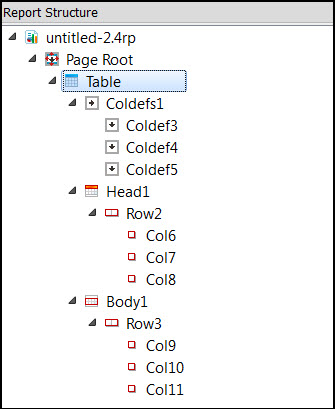
The top-level element is the Table element. It contains three child elements, which make up the parts of the table. These elements are the column definitions, the head, and the body.
The column definitions (or Coldef) define the basic properties for the columns in this table element. These properties include settings for padding, width, and alignment.
The head section contains the heading rows.
The body section contains the body rows.
A row cannot exceed the height of a page.
Table properties
Properties specific to the table involve dynamic column sizing and row-spanning cells, rules, borders, and padding.
Setting the Dynamic Layout property allows for dynamic column sizing and row-spanning cells. For more information, go to Dynamic Tables.
A rule refers to a line that separates two rows or two columns. Rule-related properties include Rule, Rule Color, Horizontal Rule, and Vertical Rule.
The border refers to the border around the table. Border-related properties include Border, Border Color, Top Border, Left Border, Bottom Border, and Right Border.
Padding refers to the space between a cell boundary and the value contained within. Padding-related properties include Padding, Horizontal Padding, and Vertical Padding.
Column properties
Column properties are specific to the column selected. Any column property set overrides the same property set for the table.
Set the padding for the cells of a column. Padding-related properties include Padding, Horizontal Padding, and Vertical Padding.
Set the width of a column using Proportional Width or Fix Width.
These settings are always applied, even when a table is set to be dynamic.
Set the alignment of a value within the cells of a column with the Horizontal Alignment and Vertical Alignment properties.
Cell properties
Cell properties are specific to the cell selected. Any cell property set overrides the same property set for the table or the column.
Set the padding for the cells of a column. Padding-related properties include Padding, Horizontal Padding, and Vertical Padding.
Set the alignment of a value within the cells of a column with the Horizontal Alignment and Vertical Alignment properties.
You can merge cells by setting the Column Span property.
Examples
- The TableDemo.4rp shows a report design document with a simple table containing five columns and two rows. One row is the Any Page Header row, while the other row is the Body row.
- The GroupedTableDemo.4rp shows a report design document where the table is more complex, with several header and body rows. For each header row, the section property specifies whether it is the First Page Header, Any Page Header, and so on. Each body row is created with a purpose - to show a row of data, to show the sum of a group of rows, and so on. Some of the cells in the summary rows span columns. Triggers are used to determine when each of the body rows is output to the table in the report.
- The DynamicTableInvoice.4rp shows a report that implements a dynamic table.