Set a request body
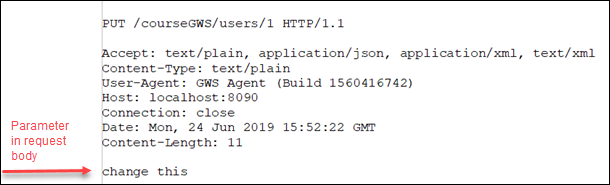
Functions that create or update a resource need to set a request body for the incoming payload. You specify the request body in an input parameter.
A message body is required when you perform an HTTP PUT or POST request to a resource, otherwise the request results in the error-9106.
In your BDL function, you specify a request body by declaring an input parameter that does not
have any of the REST parameter
attributes (WSHeader, WSQuery, WSCookie).
In the example
the single input parameter ("lname") is defined as a string. It is not defined with
a REST attribute and its content is therefore sent in the body of the HTTP request.
If the data type is not a primitive data type, you may need to define a type suitable for the structure in your module. You reference the type in your input parameter. For an example, see Example: create resource with WSPost. The function needs to receive data of the required structure for the resource in either a JSON or XML representation.
Example specifying a request body
IMPORT com

PUBLIC
DEFINE myerror RECORD ATTRIBUTE(WSError="My error")
  code INTEGER,
  reason STRING
END RECORD

PUBLIC FUNCTION updateUsersField(
    id INTEGER ATTRIBUTES(WSParam, WSDescription="User id") ),
    lname STRING ATTRIBUTE(WSDescription="User's last name"))
  ATTRIBUTES(WSPut,
             WSPath="/users/{id}",
             WSDescription="Update name of a given user",
             WSThrows="400:@myerror")
  RETURNS STRING
    DEFINE ret STRING
    WHENEVER ERROR CONTINUE
    UPDATE users SET
         user_name=lname
         WHERE @user_id = id
    WHENEVER ERROR STOP
    CASE
    WHEN SQLCA.SQLCODE == 0
         LET ret = SFMT("Updated user: %1",lname)
    WHEN SQLCA.SQLCODE == NOTFOUND
         LET ret = SFMT("No row was found with ID:  %1",id)
    OTHERWISE
        LET myerror.reason = SFMT("SQL error:%1 [%2]",SQLCA.SQLCODE, SQLERRMESSAGE)
        CALL com.WebServiceEngine.SetRestError(400,myerror)
    END CASE
    RETURN ret
END FUNCTION